


Variable frequency drives, or VFDs, are the MVPs of many operations because they deliver the ability to control motor speed and torque with flexibility and precision. VFDs are used in everything from appliances and HVAC systems to massive pumping systems for water and wastewater operations. Their benefits include energy savings, the ability to optimize processes, and data collection.
Although VFDs do sometimes fail, that’s rarer than you might think. Knowing how to properly diagnose what’s actually happening can help you extend the life of your system and keep your drives running smoothly for the long term. The reality is that most VFD faults are symptoms of upstream or downstream problems — not failed drives. VFDs protect themselves when something goes wrong.
Let’s examine what typically causes VFD faults, why diagnosis can be trickier than expected, and how to correctly identify the source of the trouble.
Fault vs. Failure — And Why It Matters
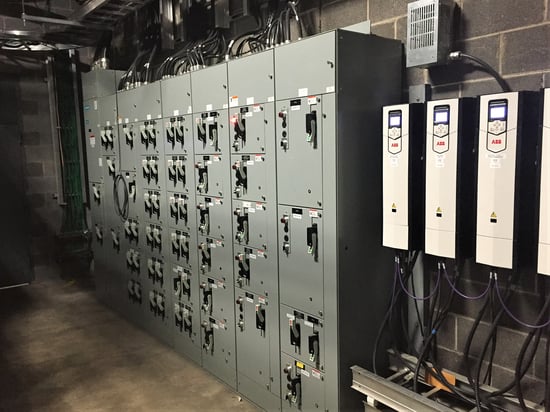 A VFD fault is not the drive failing. A fault or alarm simply means that an abnormal condition has been detected, whereas a failure is when there has been an internal hardware breakdown, much less common.
To ensure performance, VFDs constantly monitor current and voltage output, which provides insight into many system conditions. If something isn’t right, the VFD will stop or display a fault to prevent damage.
Typical causes of VFD faults may include:
- Pump or mechanical problems
- Bearing wear
- Power quality problems
- Improper grounding
- Environmental conditions
- Sensor issues
- Incorrect programming
Understanding what the drive is telling you is key to solving the problem. The underlying issue is often external to the VFD and possibly not an electrical issue at all.
For example, as torque requirements rise, current output must increase to compensate for the additional load. Because the drive is monitoring the current, the rise in current can cause the drive to generate an overcurrent fault and shut down.
This could be caused by several issues, including bearing failure over time, closed valves increasing back pressure, or material caught in the impeller blades. None of these issues are internal to the VFD or even the electrical system; however, the VFD is protecting itself (and the system) by telling you, “Hey, it’s taking too much work to run this motor.”
Think Outside the Drive: The System Perspective
Because VFDs are always part of a larger system, you need to think systemically when analyzing the problem. Every VFD is connected to other components and equipment that include:
- A power supply/power grid
- A motor which is driving a pump/mechanical load
- Instrumentation (pressure, level, flow)
- A control system (PLC/SCADA)
- Infrastructure (piping, valves, etc.)
Most often, faults are a sign that the VFD is reacting to the system. The VFD itself is rarely the cause. Understanding your unique system is key to the diagnostics process.
The Most Common Causes of VFD Faults
The causes of faults tend to fall into a few common categories.
1. Mechanical and process issues
- Pumps clogging due to binding on the impeller from things like rags or debris
- Cavitation or air entrainment, which can result in imbalance on impellers
- Damage to impellers often caused by cavitation or debris in the system
- Flow restrictions often caused by valves or changes in the piping system
- Bearings that fail due to wear or mechanical wear
2. Power and electrical issues
- Phase loss or voltage sag
- Unbalanced currents between the phases
- Loose connections or failing components
- Poor power quality (grid fluctuations)
- Blown fuses or bad disconnects
3. Wiring and grounding problems
- Improper grounding or ground loops
- Electrical noise from switching frequencies, which cause issues on the signal wires
- Signal and power wires run together
- Damaged insulation or cable issues
4. Environmental factors
- Heat and improper ventilation as a primary driver of failure
- Dust buildup due to removed enclosure filters
- Moisture and corrosive environments due to improper sealing of the drive or enclosure
- Blocked airflow, clogged fan filters, or failed cooling fans
5. Control and instrumentation errors Faulty sensors (level, pressure, flow)
- Incorrect scaling of the signals
- Incorrect wiring (NO vs NC contacts)
- Missing interlocks or safety conditions
- SCADA/PLC communication issues
VFD Detective Work: Real-World Troubleshooting Scenarios
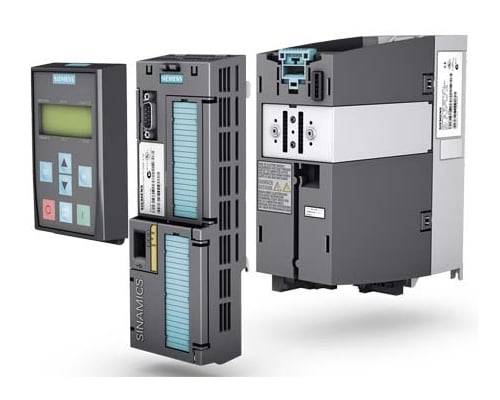 All too often, when there is a VFD fault, the VFD is blamed. Instead, focus on finding the root cause, which is likely to be an upstream or downstream issue.
The following scenarios are examples of common VFD troubleshooting issues and are not intended to replace application-specific diagnostics or appropriate electrical safety procedures. Troubleshooting steps will vary based on the equipment, application, and fault conditions. Consult your MCE rep for help identifying the root cause and determining the appropriate corrective action.
Electrical Noise Problems
- Symptom: Intermittent VFD faults, communication errors, or unexplained shutdowns that occur inconsistently
- Assumption: The VFD communication card is failing and needs to be replaced.
- Actual Root Cause: Poor grounding, improper wiring layout, electrical noise interference, or damaged cabling causing false faults and unstable system behavior.
- The Fix: Because the problem is intermittent, you can assume the VFD is set up properly. Check and correct the grounding if necessary. The signal wires should be run in a shielded cable or conduit. The shielding should be grounded on one end only (not both), to prevent ground loops. Confirm the line voltage and load voltage wiring are run in different conduits. High-voltage power can induce EMF interference on the signal wiring. Inspect and replace any damaged cables. Damaged insulation can be weak and allow signals to short to ground.
Mechanical Load Issues
- Symptom: The VFD trips on an overcurrent fault, and the motor begins slowing down, overheating, or operating inefficiently.
- Assumption: The drive is malfunctioning or unable to handle the load.
- Actual Root Cause: A clogged or overloaded pump, debris wrapped around the impeller, worn and overheating bearings, or motor grounding issues causing bearing damage and increased mechanical resistance.
- The Fix: First, disconnect the motor leads from the VFD and run the VFD. The fault should go away. This verifies the VFD is operating correctly. Next, with the motor leads disconnected, MEG the motor. All three phases should be reading the same. If not, there is an issue with the motor windings or motor leads. Next, inspect the pump and motor system for blockages. Look for buildup on the impeller from fats, oils, or grease (FOG) as this can cause impeller inefficiency. If there is wear at the edges of the impeller this could be due to cavitation eroding the impeller. Check for bearing wear by rotating the impeller. It should rotate freely with no grinding.
Diagnose Before You Replace
Because most VFD faults are symptoms of larger system issues, effective troubleshooting starts by stepping back and looking at the full picture. A systematic approach can help you identify the true root cause faster, avoid unnecessary replacements, and reduce downtime.
Step 1: Check What Changed
Start by asking a few basic questions about the system:
- Is this a new installation or an existing system?
- Has anything changed recently, such as a pump replacement, new wiring, valve adjustments, or programming updates?
- When does the fault occur?
- Does it happen consistently or only at certain times of day?
- What other equipment is connected to the system?
Seemingly small changes in the system can trigger VFD faults if the repercussions are not thought through.
Step 2: Observe the Symptoms
Some of the most useful diagnostic clues come from simple observations. Use your senses to identify potential problems:
- Sight: Look for burned insulation, discolored wires, loose connections, dust buildup, burn marks or discolored plastic, or signs of overheating.
- Sound: Listen for unusual humming, grinding, vibration, or cavitation. Does the VFD or pump sound different than it used to?
- Smell: Burning insulation or electronics can indicate overheating or electrical damage.
- Touch: Excessive heat or vibration may point to motor, bearing, or load issues.
These observations can narrow down the cause of the issue whether it is electrical, mechanical, or environmental.
Step 3: Review Fault Logs and System Patterns
The VFD itself can be one of your best diagnostic tools. Review the drive’s fault codes and history log to identify trends and recurring conditions. Pay close attention to:
- Time of day
- Load changes
- Speed changes
- Repeating alarm patterns
- Communication interruptions
Fault timestamps can help connect drive alarms to specific operating conditions or process events happening elsewhere in the system. Is it occurring every time another system in the plant starts up? Maybe it occurs when the well reaches a certain level? Or maybe it is tied to weather conditions or certain pump speeds. These observations can indicate deeper system-wide issues.
Step 4: Inspect the Power Supply, Motor, and Load
Once you’ve gathered initial clues, start working outward from the drive and inspect the larger system. Check:
- Power quality and incoming voltage. You may need to get the power company involved or perform power studies.
- Grounding and wiring. Confirm the system is grounded properly without ground loops, and the motor is grounded to the VFD, and not a separate ground. Confirm the power and signal wires are separated with proper grounds on the shielding.
- Motor condition and bearing health. Confirm the pump and motor turn easily with no scrubbing or grinding. Look at the impeller and remove any buildup, but also look for wear or cavitation damage.
- Pump or mechanical load conditions. Confirm the load is properly sized for the application. For example, grinder and chopper pumps requires heavy-duty VFDs due to their overload conditions.
- Sensors and instrumentation accuracy. Use a meter and confirm the output of the sensor over a range of outputs. Check the VFD settings against the sensor output for proper scaling (0-10V vs 4-20mA).
Remember that overcurrent, overheating, and communication faults are often caused by issues like clogged pumps, damaged bearings, poor grounding, or electrical noise — not the drive itself.
Step 5: Confirm Whether the Drive Is Actually Failing
Although true VFD failures are less common, they do happen. After ruling out system-related causes, look for signs of an actual internal drive failure, such as:
- No power or display
- Faults related to the control boards
- Faults occurring with disconnected loads
- Persistent internal faults after reset
- Burned components or visible overheating
- Repeated failures that continue after surrounding issues are corrected
Replacement is the last step, not the first. In many cases, the VFD is doing exactly what it was designed to do: protecting the system and alerting you to a larger problem.
Shock-Proof Your Investigation
Before we go any further, it’s important to stress the importance of safety procedures. Always wear PPE (personal protective equipment) when working on VFDs. Make sure that you follow lockout/tagout procedures to ensure power is fully disconnected.
Even after incoming power is removed, capacitors inside a VFD can retain a dangerous electrical charge. Follow the drive manufacturer’s specified discharge time before beginning work. You might want to consider this a good opportunity for a coffee break.
Do not rely solely on an indicator light turning off. After the required waiting period, verify that hazardous voltage is no longer present using an appropriate voltage tester before touching internal components.
VFD Fault Prevention and Best Practices
Many VFD faults can be prevented long before they lead to downtime. Because drives operate as part of a larger system, reliability depends not only on the drive itself, but also on the surrounding environment, wiring, programming, and maintenance practices.
Taking a proactive approach can extend equipment life, improve system stability, and reduce unnecessary troubleshooting and replacements.
Environment: Protect Drives from Heat and Contamination
Heat is the biggest threat to VFDs. Excessive temperatures, poor airflow, and contamination can shorten the lifespan of internal components and increase the likelihood of faults. To protect your drives:
- Keep cabinets and drives clean
- Vacuum dust out rather than blowing it deeper into equipment with compressed air
- Ensure proper airflow and ventilation in cabinets
- Regularly inspect and replace filters
- Check cooling fans for proper operation
- Monitor for moisture or corrosive environmental conditions
- Always keep the enclosure door closed
Grounding and Wiring: Reduce Electrical Noise and Instability
Improper grounding and poor wiring practices can create false faults, communication problems, and unstable operation. Because VFDs use high-speed switching components, they can generate electrical noise that interferes with nearby equipment if systems are not installed correctly.
Best practices include:
- Give each VFD its own dedicated ground
- Ground the motor to the VFD, not the panel ground
- Avoid ground loops
- Use shielded cable whenever possible
- Separate power wiring and signal wiring
- Run line voltage and load voltage in separate conduits
- Inspect cables regularly for damaged insulation or wear
- Check for proper ground on the enclosure or VFD to true earth ground
Proper grounding and cable management can prevent many intermittent or difficult-to-diagnose issues.
Programming: Verify Settings Match the Application
Incorrect drive settings can create performance problems that appear to be equipment failures. Reviewing programming during startup and troubleshooting can help eliminate unnecessary complications.
Pay close attention to:
- Ramp times that are too fast or too slow
- Incorrect PID tuning
- Wrong motor full load amperage (FLA) settings
- Incorrect direction or enable signals
- Missing interlocks or safety conditions
Most quality VFDs now have automatic motor tuning. Make sure to run this with any motor change as this tunes the VFD performance to the individual characteristics of the motor and pump.
Maintenance: Don’t Wait for Problems to Appear
Routine preventive maintenance can help VFDs operate reliably for 20 years or more. Regular inspections also make it easier to identify developing problems before they lead to shutdowns. Recommended maintenance practices include:
- Inspect electrical connections at least annually
- Perform tug tests on wires to check for loose connections
- Clean dust buildup from drives and cabinets
- Inspect heat sinks and cooling systems
- Check fans and airflow paths
- Monitor motor vibration and bearing health
Consistent maintenance improves uptime while reducing the likelihood of recurring faults.
Monitoring: Track System Performance Over Time
Monitoring normal operating conditions can identify changes before they become failures. VFDs provide valuable system data that can be used to spot developing trends and diagnose issues early.
Helpful monitoring practices include:
- Record normal operating frequency (Hz) and load conditions
- Review fault history logs regularly
- Watch for recurring alarms or patterns
- Use thermal imaging tools, such as FLIR cameras, to identify overheating components
- Track changes in vibration, current draw, or temperature
Almost any parameter or datapoint in the drive can be sent over communications. Document key performance indicators of the VFD in the SCADA system such as current, frequency, input/output status, and phase conditions.
The more baseline data you have available, the easier it becomes to recognize abnormal behavior and pinpoint root causes quickly.
The Drive to Succeed: A System-Wide Mindset
VFDs are designed to protect both themselves and the systems they control. When a fault occurs, it’s often a sign that something else needs attention whether that is a mechanical issue, wiring problem, environmental condition, or control-system error.
Approaching troubleshooting with a system-wide mindset can help teams diagnose problems more efficiently, avoid unnecessary drive replacements, and reduce costly downtime. By combining careful observation, preventative maintenance, and a structured diagnostic process, operations can improve reliability while getting the full long-term value from their VFDs.
Need help troubleshooting persistent VFD faults? Whether you’re dealing with recurring faults, power quality concerns, motor issues, or preventative maintenance planning, our team is ready to help. Contact MCE to discuss your system and find the right solution for your operation.
